Closes#15636Closes#15638Closes#15637
I noticed that I forgot to update the bundled `lightningcss`
dependencies in the `standalone` project. This makes sure we have the
same version everywhere.
Upgrading `lightningcss` to fix invalid `list-style: none` conversion.
I've also reverted the change to preflight while at it, since it's no
longer necessary.
This PR fixes an issue where JavaScript plugins were still able to
contribute `@keyframes` when loaded inside an `@reference` import. This
was possible because we only gated the `addBase` API and not the
`addUtilities` one which also has a special branch to handle `@keyframe`
rules.

To make this work, we have to create a new instance of the plugin API
that has awareness of wether the plugin accessing it is inside reference
import mode.

## Test plan

Added a unit test that reproduces the issue observed via #15544
This PR adds a new `@reference "…"` API as an replacement for the
previously added [`@import "…"
reference`](https://github.com/tailwindlabs/tailwindcss/pull/15228). The
motivation for a distinct at rule is that `@import` is already handled
outside of Tailwind in some scenarios (e.g. when using in combination
with postcss-import, other pre-processors, or frameworks like Svelte).
While our implementation of hijacking the `media` attribute _works in
this cases_, it can cause annoying linter issues because tooling build
around `@import` does not know about our behavior.

To fix this, we've decided to move this mode into a separate at rule
that is passed-through in the other tooling. Here's an example of how
this would look like in Svelte:

```svelte
<h1>Hello world!</h1>

<style>
  @reference './theme.css';
  h1 {
    color: var(--theme-color);
  }
</style>
```

With this change, the Svelte linter would not be detecting unused CSS
from the `theme.css` file as it would if we'd rely on `@import`.
This PR prevents the migration of utilities detected in function names,
e.g.: the use of `shadow` inside `filter: 'drop-shadow(…)'`.

## Test plan

Have content like this in a project you're migrating using the upgrade
tool:

```js
{
  filter: 'drop-shadow(0 0 0.5rem #000)'
}
```

This was verified by adding unit tests to the specific codemods and
adding an integration test.
Resolves https://github.com/tailwindlabs/tailwindcss/discussions/15387

This PR changes the Chrome target to 111. We initially picked 120
because of the unnecessary `:dir()` down-leveling but we that was maybe
a bit too recent as it was causing some necessary prefixes to not be
generated (e.g. `-webkit-background-clip`).

This PR changes it to 111 which we require for the `color-mix()`
function. To work around the `:dir()` down-leveling we also disable the
`DirSelector` lightningcss feature which is used to control this
behavior:
https://sourcegraph.com/github.com/parcel-bundler/lightningcss/-/blob/src/selector.rs?L1964-1965
Resolves#15315
It looks like we implemented this in Core but forgot to expose it from
the distributed package (the references are only used for testing
plugins internally right now). This exposes `flattenColorPalette` under
the old import path of `tailwindcss/lib/util/flattenColorPalette`.
## Test Plan
Added the following plugin to the Vite example and ensured it works as
expected:
```ts
import flattenColorPalette from 'tailwindcss/lib/util/flattenColorPalette'
import plugin from 'tailwindcss/plugin'
export default plugin(({ matchUtilities, theme }) => {
matchUtilities(
{
'hover-bg': (value) => {
return {
'&:hover': {
backgroundColor: value,
},
}
},
},
{ values: flattenColorPalette(theme('colors')) },
)
})
```
<img width="462" alt="Screenshot 2024-12-06 at 11 47 44"
src="https://github.com/user-attachments/assets/11163390-053e-4c6e-8cb9-ae67184ad594">
Resolves#15320Resolves#15175
Turns out that the postcss file watcher does not like our Unix based
paths and will print a warning about them. This fixes the issue by
calling `path.resolve()` to convert it back to a Windows-style absolute
path if necessary.
## Test Plan
Tested on Windows with a new Next.js 14 project. Ensured that file
reloads also still work (changes to the `tsx` file are picked up
correctly). Also ensure that the CI runs on Windows.
### Before
<img width="1178" alt="Screenshot 2024-12-06 at 13 12 23"
src="https://github.com/user-attachments/assets/70c1fe45-6983-4fb4-9889-716a0cbef03a">
### After
<img width="1196" alt="Screenshot 2024-12-06 at 13 23 24"
src="https://github.com/user-attachments/assets/0b9e3ff7-c5b6-4ccb-85a9-e7ba7aee355a">
Closes#15219
This PR adds a new feature, `@import "…" reference` that can be used to
load Tailwind CSS configuration files without adding any style rules to
the CSS.
The idea is that you can use this in combination with your Tailwind CSS
root file when you need to have access to your full CSS config outside
of the main stylesheet. A common example is for Vue, Svelte, or CSS
modules:
```css
@import "./tailwind.css" reference;
.link {
@apply underline;
}
```
Importing a file as a reference will convert all `@theme` block to be
`reference`, so no CSS variables will be emitted. Furthermore it will
strip out all custom styles from the stylesheet. Furthermore plugins
registered via `@plugin` or `@config` inside reference-mode files will
not add any content to the CSS file via `addBase()`.
## Test Plan
Added unit test for when we handle the import resolution and when
`postcss-import` does it outside of Tailwind CSS. I also changed the
Svelte and Vue integration tests to use this new syntax to ensure it
works end to end.
---------
Co-authored-by: Jordan Pittman <jordan@cryptica.me>
Closes#15138
This PR changes the postcss client to run in the `Once` hook instead of
`OnceExit`. This makes sure the postcss order in v4 matches that of v3.
Conceptually this also makes more sense, since we expect tailwindcss to
be run as one of the first plugins in the pipeline (where `OnceExit`
would run it almost at the end).
To make sure it's still possible to use `postcss-import` before and have
it resolve to the right paths, we also needed to change the
`postcss-fix-relative-paths` plugin to run in the `Once` order
(`postcss-import` also uses `Once` order so the order).
## Test Plan
This issue had many ways in which it can manifest. I added a unit test
to ensure the plugin order works but here's a concrete example when
using the postcss plugin in Vite.
### Before
Image `url()`s were not properly handled since the postcss plugin to
transform these was run before Tailwind CSS could generate the class for
it:
<img width="2532" alt="Screenshot 2024-12-02 at 14 55 42"
src="https://github.com/user-attachments/assets/2f23b409-1576-441d-9ffe-6f24ad6e7436">
### After
<img width="2529" alt="Screenshot 2024-12-02 at 14 53 52"
src="https://github.com/user-attachments/assets/b754c3d8-1af1-4aeb-87da-0bfc3ffecdb7">
---------
Co-authored-by: Jordan Pittman <jordan@cryptica.me>
Closes#15250
This PR simplifies our Vite integration even more. It turns out that in
some projects (see #15250 for the exact repro), the way we invoke
`svelte-preprocess` was actually causing issues in Vite since with Vite,
it's expected to use the `sveltePreprocess` version exported by
`sveltejs/vite-plugin-svelte`.
While trying to change this we noticed that there are different versions
of `sveltejs/vite-plugin-svelte` for Vite 5 and Vite 6 which caused us
to investigate even more and we noticed that we do not even need to
recursively call into the `sveltePreprocess()` as every plugin is run
after each other anyways. This allows us to drop the dependency on
`svelte-preprocess` and simplify the code a bit more, registering only a
`(string) => string` style transformer.
## Test Plan
This was tsted on the repro repo from #15250 as well as the SvelteKit
setup from [my
playgrounds](https://github.com/philipp-spiess/tailwindcss-playgrounds).
Furthermore we tested various combinations of `svelte`,
`@sveltejs/vite-plugin-svelte` and `vite` in our integration test to
ensure everything works as expected.
---------
Co-authored-by: Jordan Pittman <jordan@cryptica.me>
Closes#15269
This PR fixes an issue where our Vite extension was rebasing absolute
urls inside `@import`-ed files. We forgot to cover this when we
implemented the URL rebasing.
## Test Plan
We validated that this fixes the repro in #15269:
<img width="851" alt="Screenshot 2024-12-02 at 18 07 35"
src="https://github.com/user-attachments/assets/3b2c2be3-1f73-469e-9f64-301c6b948b02">
Also added a unit test for this.
Co-authored-by: Jordan Pittman <jordan@cryptica.me>
`overflow-clip` was the name for `text-clip` in v4. However, that was
changed in v3 already so in v3 `overflow-clip` is already doing the same
as in v4. Hence a codemod is not necessary.

Co-authored-by: Adam Wathan <adam.wathan@gmail.com>
Closes#15131
This PR adds a CI step to build the Windows ARM artifacts on the Windows
x64 CI runners after some trial and error with the custom Windows ARM
runners which turned out to not be necessary.
## Test Plan
I changed the workflow so that it uploads the tarballs to the build
artifact and runs on the PR. Then, I downloaded the artifacts and
installed them in a npm project on Windows with ARM:
<img width="1187" alt="Screenshot 2024-11-27 at 11 35 15"
src="https://github.com/user-attachments/assets/1732ac3e-9410-4ed8-a49c-279faf6df50f">
Co-authored-by: Adam Wathan <adam.wathan@gmail.com>
Closes#15159
This PR extends the `@tailwindcss/node` packages to be able to overwrite
the CSS and JS resolvers. This is necessary as some bundlers, in
particular Vite, have a custom module resolution system that can be
individually configured. E.g. in Vite it is possible to add custom
[resolver
configs](https://vite.dev/config/shared-options.html#resolve-conditions)
that is expected to be taken into account.
With the new `customCssResolver` and `customJsResolver` option, we're
able to use the Vite resolvers which take these configs into account.
## Test Plan
Tested in the playground by configuring [resolver
conditions](https://vite.dev/config/shared-options.html#resolve-conditions)
(with Vite 5.4 and Vite 6 beta). An integration test was added for both
the JS and CSS resolvers to ensure it keeps working as expected.
---------
Co-authored-by: Adam Wathan <adam.wathan@gmail.com>
This PR updates all our Vite dependencies to the newly released v6.
Nothing changed in our released Vite extension so this does not need a
user-facing changelog.

## Test Plan

The Vite playground still works. Furthermore we have a pretty extensive
Vite integration test suite that now runs on v6.
Resolves#15193
This PR fixes an issue where `group` and `peer` would not have their
prefixes migrated as part of the upgrade script. We do this by
registering `group` and `peer` as utilities during the codemods. This
way, `parseCandidate` will find these classes to be valid Tailwind
candidates and the prefix can be migrated just like any other utility.
## Test Plan
Tried it with the v3 upgrade playground in the repo and it worked fine:
<img width="1257" alt="Screenshot 2024-11-27 at 12 17 25"
src="https://github.com/user-attachments/assets/1ee101e1-1d6a-4ce0-b0d4-8d51e5f6b0d2">
I've also added tests to our prefix upgrade integration test and the
prefix migration unit tests.
After the changes in #15201, our Windows CI started to fail. The problem
is that lightningcss now needs to convert `oklch` colors into the
`oklab` space to inline some `color-mix()` functions.

The problem, though, is that this calculation seems to have rounding
differences between macOS, Linux, and Windows. Since we still want to
_define the default color space in `oklch`_ and _use lightningcss as a
post-processor in our unit tests so we have a better coverage of the
output_, this PR attempts to fix the issue by adding a custom vitest
serializer. It will find usages of the `oklab()` function with arguments
that have lots of decimal places (at least 6 decimal places). What it
then does is simply cut off any excess decimal places to truncate the
output to 5 places. E.g.:

```diff
- oklab(62.7955% .224863 .125846 / .75);
+ oklab(62.7955% .22486 .12584 / .75);
```

## Test Plan

I updated the CI workflow file to make all three builds run in CI and
observed that they are now all green again.

<img width="609" alt="Screenshot 2024-11-27 at 14 54 52"
src="https://github.com/user-attachments/assets/73fe6da5-30e3-4fd4-83ea-115b1f1602a6">
Closes#15160
We need to set browser targets for each browser individually to see
vendor prefixes created for each browser.
Exact values are up for discussion, this first pass is taken from
@adamwathan's comments in
https://github.com/tailwindlabs/tailwindcss/issues/15160
---------
Co-authored-by: Adam Wathan <adam.wathan@gmail.com>
This PR improves compatibility for named `opacity` theme values. One of
the changes in v4 is that we use the CSS `color-mix()` function to apply
opacity to colors. This, however, is limited to percentage values only:

```css
color: color-mix(in oklch, var(--color-red-500) 50%, transparent);
/*                                              ^^^             */
/*                          This needs to be a percentage value */
```

In v3, however, it was common to specify custom opacity values as
decimal numbers. That's also what we did in our default config:


https://github.com/tailwindlabs/tailwindcss/blob/6069a811871c58a9b202fbb3a6f13774c57278c0/stubs/config.full.js#L703-L725

This PR improves interop with these values by:

1. Converting decimal numbers in the range of `[0, 1]` to their
percentage value equivalent when using the interop layer.
2. Adjusts the codemod that migrates `opacity` theme keys to Tailwind v4
theme variables to include the same conversion.
3. Furthermore, due to the added support of named opacity modifers, we
can also drop theme keys that would now be the default. For example the
following config would not be necessary in v4 as the opacity modifier
would accept the value `50` by default:
    ```js
    module.exports = {
      theme: {
        opacity: {
          50: 0.5
        }
      }
    }
    ```

## Test Plan

Added a new integration test for the codemod and a unit test for the
interop layer. I also re-ran the codemod on the Commit template and it's
now working as expected (left is v3, right is v4):

<img width="2560" alt="Screenshot 2024-11-21 at 17 25 32"
src="https://github.com/user-attachments/assets/f0c87243-ca80-4c39-ae5e-c1ab48fbe614">
While testing the latest alpha release across Tailwind v3 projects, we
noticed one regression in relation to the default color of `<button>`
elements. In v3, the reset would change the default to `inherit` but in
v4 we would _not include it in the reset snippet inserted by the upgrade
too_.
This PR changes the upgrade snippet to include it:
```diff
/*
In Tailwind CSS v4, basic styles are applied to form elements by default. To
maintain compatibility with v3, the following resets have been added:
*/
@layer base {
input,
textarea,
select,
button {
border: 0px solid;
border-radius: 0;
padding: 0;
+ color: inherit;
background-color: transparent;
}
}
```
This PR also ensures that there's a newline between the two code
snippets.
## Test Plan
### Before

### After
<img width="1354" alt="Screenshot 2024-11-21 at 15 42 58"
src="https://github.com/user-attachments/assets/9a4503fe-683f-4d08-abf2-7dd111ed5428">
This PR introduces consistent base styles for buttons and form controls
in Tailwind CSS v4.

## Motivation

In v3, form elements lack default styles, which can be
confusing—especially when certain elements, like a text input without a
placeholder or value, are rendered completely invisible on the page.

The goal of this change is to provide reasonable default styles for
buttons, inputs, selects, and textareas that are (mostly) consistent
across all browsers while remaining easy to customize with your own
styles.

This improvement should make Tailwind more accessible for developers new
to the framework and more convenient in scenarios where you need to
quickly create demos (e.g., using Tailwind Play).

## Light and dark mode support

These styles support both light and dark mode, achieved using the
`light-dark()` CSS function. While browser support for this function is
still somewhat limited, Lightning CSS transpiles it to a CSS
variable-based approach that works in older browsers.

For this approach to function correctly, a default `color-scheme` must
be set in your CSS (as explained in [the Lightning CSS
documentation](https://lightningcss.dev/transpilation.html#light-dark()-color-function)).
This PR addresses this requirement by setting the `color-scheme` to
`light` on the `html` element in Preflight.

<img width="1712" alt="image"
src="https://github.com/user-attachments/assets/dba56368-1427-47b3-9419-7c2f6313a944">

<img width="1709" alt="image"
src="https://github.com/user-attachments/assets/3d84fcd2-9606-4626-8e03-164a1dce9018">

## Breaking changes

While we don’t expect these changes to significantly impact v3 users
upgrading to v4, there may be minor differences for those relying on the
simpler v3 styles.

For example, Preflight now applies a `border-radius` to buttons and form
controls. If you weren’t explicitly setting the border radius to `0` in
your project, you’ll need to do so to restore the previous look.

Thankfully, reverting to the v3 styles is straightforward—just add the
following reset to your CSS:

```css
@layer base {
  input,
  textarea,
  select,
  button {
    border: 0px solid;
    border-radius: 0;
    padding: 0;
    background-color: transparent;
  }
}
```

It’s worth noting that this reset doesn't touch the
`::file-selector-button` styles that were added in this PR. This is
because it's not possible to reliably "undo" these styles and restore
the original user-agent styles (which is what was used in v3), as these
are different in each browser. However, these new styles actually match
the defaults in most browsers pretty closely, so hopefully this just
won't be an issue.

## Codemod

This PR includes a codemod that automatically inserts the above
mentioned v3 reset to help avoid breaking changes during the upgrade.
The codemod will insert the following CSS:

```css
/*
  In Tailwind CSS v4, basic styles are applied to form elements by default. To
  maintain compatibility with v3, the following resets have been added:
*/
@layer base {
  input,
  textarea,
  select,
  button {
    border: 0px solid;
    border-radius: 0;
    padding: 0;
    background-color: transparent;
  }
}
```

## Testing

These changes have been tested across a wide range of browsers,
including Chrome, Safari, Firefox, Edge, and Opera on macOS and Windows,
as well as Safari, Chrome, Firefox, and several lesser-known browsers on
iOS and Android.

However, some quirks still exist in certain mobile browsers, such as iOS
Safari, which adds too much bottom padding below date and time inputs:

<img width="1548" alt="Screenshot 2024-11-20 at 3 57 20 PM"
src="https://github.com/user-attachments/assets/507c7724-ac41-4634-a2b3-61ac4917ebce">

The only reliable way to address these issues is by applying
`appearance: none` to these form controls. However, this felt too
opinionated for Preflight, so we’ve opted to leave such adjustments to
user-land implementations.

---------

Co-authored-by: Jonathan Reinink <jonathan@reinink.ca>
Co-authored-by: Jordan Pittman <jordan@cryptica.me>
Closes#15050
In Tailwind CSS v4 Alpha 31 we changed how we scan template files. This
changes included a new folder-dependency that is emitted for the `base`
directory, so we can listen for new files being added as part of the
postcss dependency.
In our testing, this worked fine with the Next.js integration meaning a
new file in the project root would be picked up by Oxide and we could
update the CSS files accordingly.
This change is now, however, causing an issue. With Next.js 15 **and
with a custom `distDir` configured**, the postcss build, that will write
into the `distDir`, will cause another postcss run to be triggered,
starting an endless loop (regardless of wether or not the `distDir` was
also part of your gitignore list).
This PR now changes the postcss client to not emit the base directory as
a dependency to revert this changes. This does mean that new files and
folders created _directly in the project root_ will require a restart of
the Next.js server again (just like it did in Alpha 31 and before) for
now.
## Test Plan
Next 15 does not seem to run in our current integration test setup (for
some reason the server does not close correctly and it will fail on the
cleanup step), so this change was tested manually:
- First, clone the [templates
repo](https://github.com/philipp-spiess/tailwindcss-playgrounds) I use
for third party frameworks
- Then, do a full build in the parent repo `tailwindcss` via `pnpm
build`
- Now, install the local tarballs in the `tailwindcss-playgrounds` repo
via `pnpm install`
With this setup I have tested changes to a template file (that causes
new utilities to be added) and the CSS file (that will rebuild properly)
across both `pnpm dev` and `pnpm dev --turbo`. Furthermore integration
tests assert it still works in Next 14 like it did before:
https://github.com/user-attachments/assets/b0ccb3dd-d090-4e4c-97c5-74129a2789be
One thing to make sure of is to include the new `distDir` into the
`.gitignore` file as well, otherwise we will scrape it for changes which
inherently causes an endless loop issue again.
---------
Co-authored-by: Adam Wathan <adam.wathan@gmail.com>
This PR updates the `jiti` dependency we use for plugin loading to the
latest stable release.

## Test Plan

This was relying on integration tests which contains example of
TypeScript configs. It's also rebased to include the new examples from
https://github.com/tailwindlabs/tailwindcss/pull/15041.
Closes#15012
We do not have replacements for these plugins _just yet_. In order to
increase compatibility with setups that rely on some of these legacy
plugins, this PR bundles `@tailwindcss/forms`,
`@tailwindcss/typography`, and `@tailwindcss/aspect-ratio` (after
https://github.com/tailwindlabs/tailwindcss/pull/15029) with the
standalone build now.
In comparison to v3, this omits the `@tailwindcss/container-queries`
plugin since is not a first-party feature of Tailwind CSS v4.
## Test Plan
Added an integration test. I also tested this by running the standalone
binary in a temporary folder with as simple input css:
```css
@import "tailwindcss";
@plugin "@tailwindcss/typography";
```
In some local testing we ran the `@tailwindcss/upgrade` command twice in
a row. It would be great to get some feedback that this is not working,
so this PR now checks if it can resolve the installed version of
`tailwindcss` and if it can, it requires it to be < 4 (you can bypass
this check with `--force`).

---------

Co-authored-by: Robin Malfait <malfait.robin@gmail.com>
This PR adds support for complex `addUtilities()` configuration objects
that use child combinators and other features.

For example, in v3 it was possible to add a utility that changes the
behavior of all children of the utility class node by doing something
like this:

```ts
addUtilities({
  '.red-children > *': {
    color: 'red',
  },
});
```

This is a pattern that was used by first-party plugins like
`@tailwindcss/aspect-ratio` but that we never made working in v4, since
it requires parsing the selector and properly extracting all utility
candidates.

While working on the codemod that can transform `@layer utilities`
scoped declarations like the above, we found out a pretty neat
heuristics on how to migrate these cases. We're basically finding all
class selectors and replace them with `&`. Then we create a nested CSS
structure like this:

```css
.red-children {
  & > * {
    color: red;
  }
}
```

Due to first party support for nesting, this works as expected in v4.

## Test Plan

We added unit tests to ensure the rewriting works in some edge cases.
Furthermore we added an integration test running the
`@tailwindcss/aspect-ratio` plugin. We've also installed the tarballs in
the Remix example from the
[playgrounds](https://github.com/philipp-spiess/tailwindcss-playgrounds)
and ensure we can use the `@tailwindcss/aspect-ratio` plugin just like
we could in v3:

<img width="2560" alt="Screenshot 2024-11-18 at 13 44 52"
src="https://github.com/user-attachments/assets/31889131-fad0-4c37-b574-cfac2b99f786">

---------

Co-authored-by: Robin Malfait <malfait.robin@gmail.com>
Co-authored-by: Jordan Pittman <jordan@cryptica.me>
This PR brings back the `max-w-screen-*` utilities from v3 that read
from the `--breakpoint` namespace.

Since these utilities are only added back for compatibility reasons,
it's put into the compatibility layer.

Note that this does not do Intellisense recommendations for the
functional utility.

## Test Plan

Unit tests are upgraded including some from the compat test that extends
the `--breakpoint` namespace from `screen` keys. Also tested this in the
Vite playground.

---------

Co-authored-by: Adam Wathan <4323180+adamwathan@users.noreply.github.com>
Co-authored-by: Adam Wathan <adam.wathan@gmail.com>
We noticed that in the current alpha 34 release, the `package.json` file
of the `@tailwindcss/node` package only defines `tailwindcss` as a dev
dependency. This makes it very easy for version mismatches to happen
when a v3 version (or an earlier v4 alpha for that matter) was installed
in the same project:

```json
{
  "name": "@tailwindcss/node",
  "version": "4.0.0-alpha.34",
  "description": "A utility-first CSS framework for rapidly building custom user interfaces.",
  "license": "MIT",
  "repository": {
    "type": "git",
    "url": "https://github.com/tailwindlabs/tailwindcss.git",
    "directory": "packages/@tailwindcss-node"
  },
  "bugs": "https://github.com/tailwindlabs/tailwindcss/issues",
  "homepage": "https://tailwindcss.com",
  "files": [
    "dist/"
  ],
  "publishConfig": {
    "provenance": true,
    "access": "public"
  },
  "exports": {
    ".": {
      "types": "./dist/index.d.ts",
      "import": "./dist/index.mjs",
      "require": "./dist/index.js"
    },
    "./require-cache": {
      "types": "./dist/require-cache.d.ts",
      "default": "./dist/require-cache.js"
    },
    "./esm-cache-loader": {
      "types": "./dist/esm-cache.loader.d.mts",
      "default": "./dist/esm-cache.loader.mjs"
    }
  },
  "devDependencies": {
    "tailwindcss": "4.0.0-alpha.34"
  },
  "dependencies": {
    "enhanced-resolve": "^5.17.1",
    "jiti": "^2.0.0-beta.3"
  },
  "scripts": {
    "build": "tsup-node",
    "dev": "pnpm run build -- --watch"
  }
}
```

Furthermore, we were trying to fix issues where our integration test
setup could not install `tailwindcss@3` because of how we did pnpm
overrides.

This PR fixes this by:

- Ensuring every client that calls into `tailwindcss` core marks it as a
version-pinned dependency. You are still required to install
`tailwindcss` in your project along side a client (e.g.
`@tailwindcss/vite`) but we now only use your installed version for
importing the respective `.css` files. For the core logic, we are now
requiring each package to use `tailwindcss` at the same version. This
should help resolve issues like
https://github.com/tailwindlabs/tailwindcss/discussions/14652
- We tried to eliminate the dependency on `tailwindcss` from the
`@tailwindcss/upgrade` package. Unfortunately this is not possible to do
right now because we need to load the CSS files from v4 to create the
right environment. In a future version we could bundle the required CSS
files with `@tailwidncss/upgrade` but it doesn't seem necessary for now.
- We then changed our integration test overrides to only override the
`tailwindcss` package that are dependencies of the known list of
packages that we have `tailwindcss` dependencies on: `@tailwindcss/node`
and `@tailwindcss/upgrade`. This ensures that we can install v3 of
`tailwindcss` in the integration tests and it will work. Something we
want to do for some upgrade tests.

# Test plan

Integration work again. Furthermore we added a quick setup with the CLI
using the local tarballs and ensured it works:

```bash
pnpm init
pnpm install ../../tailwindcss/dist/tailwindcss-cli.tgz
pnpm install ../../tailwindcss/dist/tailwindcss.tgz
echo '@import "tailwindcss";' > index.css
echo '<div class="underline"></div>' > index.html
pnpm tailwindcss -i index.css -o out.css
cat out.css
```
This PR reverts https://github.com/tailwindlabs/tailwindcss/pull/14278
to bring back support for using named opacity values in color opacity
modifiers:

```css
@theme {
  --opacity-myOpacity: 50%;
}
```

```html
<div class="bg-red-500/myOpacity"></div>
```

We briefly discuss to restructure the code so that we avoid adding a
`theme` argument to the call sites but I do still prefer the current
approach for the following reasons: The way to avoid this is to a) put
something in either the `Theme` class scope, where it feels grossly out
of place, or b) put it into the shared closure in the utilities file
which is already very large and hard to reason. Furthermore, there's a
second call site in the compile function where we would need to
duplicate the namespace lookup.

Every caller of the current `asColor` value already has access to the
`Theme` so passing that as an argument seems like the least intrusive
way.

## Test Plan

Brought back the unit tests but I also tested it with the Vite
extension:

<img width="744" alt="Screenshot 2024-11-15 at 11 15 05"
src="https://github.com/user-attachments/assets/63923b80-767e-4104-b7eb-f71fc815b51e">

---------

Co-authored-by: Adam Wathan <adam.wathan@gmail.com>
This PR adds support for handling v3 [`container` customizations
](https://tailwindcss.com/docs/container#customizing). This is done by
adding a custom utility to extend the core `container` utility. A
concrete example can be taken from the added integration test.

### Input

```ts
/** @type {import('tailwindcss').Config} */
export default {
  content: ['./src/**/*.html'],
  theme: {
    container: {
      center: true,
      padding: {
        DEFAULT: '2rem',
        '2xl': '4rem',
      },
      screens: {
        md: '48rem', // Matches a default --breakpoint
        xl: '1280px',
        '2xl': '1536px',
      },
    },
  },
}
```

### Output

```css
@import "tailwindcss";

@utility container {
  margin-inline: auto;
  padding-inline: 2rem;

  @media (width >= theme(--breakpoint-sm)) {
    max-width: none;
  }

  @media (width >= 48rem) {
    max-width: 48rem;
  }

  @media (width >= 1280px) {
    max-width: 1280px;
  }

  @media (width >= 1536px) {
    max-width: 1536px;
    padding-inline: 4rem;
  }
}
````


## Test Plan

This PR adds extensive tests to the compat layer as part of unit tests.
Additionally it does at a test to the codemod setup that shows that the
right `@utility` code is generated. Furthermore I compared the
implementation against v3 on both the compat layer and the custom
`@utility`:


https://github.com/user-attachments/assets/44d6cbfb-4861-4225-9593-602b719f628f
Closes#13129
We're adding back the v3 `container` component, this time as a utility.
The idea is that we support the default `container` behavior but we will
not have an API to configure this similar to what v3 offered. Instead,
the recommended approach is to configure it by creating a custom utility
like so:
```css
@import "tailwindcss";
@utility container {
margin-left: auto;
margin-right: auto;
padding-left: 2rem;
padding-right: 2rem;
}
```
We do have an idea of how to migrate existing JS configuration files to
the new `@utility` as part of the interop layer and the codemod. This is
going to be a follow-up PR though.
## Test Plan
We added a unit test but we've also played around with it in the Vite
playground. Yep, looks like a `container`:
https://github.com/user-attachments/assets/ea7a5a4c-4cde-4ef5-9062-03e16239eb85
---------
Co-authored-by: Adam Wathan <adam.wathan@gmail.com>
Closes#14965
This PR changes the way we register Tailwind CSS as a Svelte
preprocessor when using the Vite plugin. The idea is to reduce the
bookkeeping for interacting with CSS inside `<style>` tags so that we
have a more consistent behavior and make sure the Svelte-specific
post-processing (e.g. local class mangling) works as expected.
Prior to this change, we were running Tailwind CSS as a Svelte
preprocessor and then we would transform the file again when necessary
inside the Vite `transform` hook. This is necessary to have the right
list of candidates when we build the final CSS, but it did cause some
situation to not apply the Svelte post-processors anymore. The repro for
this seemed to indicate a timing specific issue and I did notice that
specifically the code where we invalidate modules in Vite would cause
unexpected processing orders.
We do, however, not officially support rendering utilities (`@tailwind
utilities;`) inside `<style>` tag. This is because the `<style>` block
is scoped by default and emitting utilities will always include
utilities for all classes in your whole project. For this case, we
highly recommend creating as separate `.css` file and importing it
explicitly.
With this limitation in place, the additional bookkeeping where we need
to invalidate modules because the candidate list has changed is no
longer necessary and removing it allows us to reduce the complexity of
the Svelte integration.
## Test Plan
https://github.com/user-attachments/assets/32c8e91f-ab21-48c6-aeaf-2582273b9bac
Not seen in the test plan above I also tested the `pnpm build --watch`
step of the Vite project. This does require the `pnpm preview` server to
restart but the build artifact are updated as expected.
Closes#14960
When we moved to the `--spacing` multiples scale, we seemingly
overlooked a bail that caused us to use non-numerical values as a
spacing multiple. This caused the `-translate-x-full` and
`-translate-y-full` utilities to treat `full` as a valid multiple in our
spacing scale and created invalid CSS:
```css
.-translate-x-full {
--tw-translate-x: calc(var(--spacing) * -x-full);
--tw-translate-y: calc(var(--spacing) * -x-full);
translate: var(--tw-translate-x) var(--tw-translate-y);
}
```
## Test plan
I reproduced the issue in our Vite playground and then created a failing
test case. It requires a `--spacing` `@theme` variable to be defined so
I've added this as a test case now in the unit tests. I also audited all
places that are using `calc()` and wrapping some numbers. In doing so I
found a few other broken cases:
- `-translate-x-full`
- `-translate-y-full`
- `-space-x-full`
- `-space-y-full`
- `-inset-full`
I validated that the fix indeed works and no longer creates broken CSS
definitions for these cases:
<kbd><img width="1405" alt="Screenshot 2024-11-11 at 19 33 51"
src="https://github.com/user-attachments/assets/99072112-9ed4-4456-bad8-5679679e7198"></kbd>
---------
Co-authored-by: Adam Wathan <adam.wathan@gmail.com>
Closes#13305
This PR adds registers a Svelte preprocessor, used by the Svelte Vite
plugin, to run Tailwind CSS for styles inside the `<style>` block, this
enables users to use Tailwind CSS features like `@apply` from inside
Svelte components:
```svelte
<script>
let name = 'world'
</script>
<h1 class="foo underline">Hello {name}!</h1>
<style global>
@import 'tailwindcss/utilities';
@import 'tailwindcss/theme' theme(reference);
@import './components.css';
</style>
```
## Test Plan
I've added integration tests to validate this works as expected.
Furthermore I've used the
[tailwindcss-playgrounds](https://github.com/philipp-spiess/tailwind-playgrounds)
SvelteKit project to ensure this works in an end-to-end setup:
<img width="2250" alt="Screenshot 2024-11-08 at 14 45 31"
src="https://github.com/user-attachments/assets/64e9e0f3-53fb-4039-b0a7-3ce945a29179">
Part of the current changes, we also want to make the `--line-height-*`
namespace closer to the utility name so we're renaming it to
`--leading-*`:

```diff
  @theme {
-  --line-height-none: 1;
-  --line-height-tight: 1.25;
-  --line-height-snug: 1.375;
-  --line-height-normal: 1.5;
-  --line-height-relaxed: 1.625;
-  --line-height-loose: 2;

    /* ... */

+  --leading-none: 1;
+  --leading-tight: 1.25;
+  --leading-snug: 1.375;
+  --leading-normal: 1.5;
+  --leading-relaxed: 1.625;
+  --leading-loose: 2;

    /* ... */
  }
```

Notice that we did not change the nested values used in the `--text`
type scale, e.g.:

```css
@theme {
  /* Type scale */
  --text-xs: 0.75rem;
  --text-xs--line-height: 1rem;
}
```

These do not refer to the `leading` utility and instead refer to nested
properties so we're keeping those as-is.

## Test Plan

Added cases to the CSS `theme()` variable/JS plugin tests (interop
layer) and the integration tests (codemod layer).
Part of the current changes, we also want to make the
`--letter-spacing-*` namespace closer to the utility name so we're
renaming it to `--tracking-*`:

```diff
  @theme {
-  --letter-spacing-tighter: -0.05em;
-  --letter-spacing-tight: -0.025em;
-  --letter-spacing-normal: 0em;
-  --letter-spacing-wide: 0.025em;
-  --letter-spacing-wider: 0.05em;
-  --letter-spacing-widest: 0.1em;

    /* ... */

+  --tracking-tighter: -0.05em;
+  --tracking-tight: -0.025em;
+  --tracking-normal: 0em;
+  --tracking-wide: 0.025em;
+  --tracking-wider: 0.05em;
+  --tracking-widest: 0.1em;

    /* ... */
  }
```

## Test Plan

Added cases to the CSS `theme()` variable/JS plugin tests (interop
layer) and the integration tests (codemod layer).
We noticed an issue that the `theme()` function wourld not properly
parse in CSS if you split the argument list over multiple lines. This is
fixed by treating `\n` and `\t` the same as space:

```css
.custom-font {
  font-family: theme(
    fontFamily.unknown,
    Helvetica Neue,
    Helvetica,
    sans-serif
  );
}
```

## Test plan

Added tests, but also tried it in the Vite example:

<img width="1995" alt="Screenshot 2024-11-08 at 13 46 09"
src="https://github.com/user-attachments/assets/f9bf94b0-3f9b-4334-8911-9190987e2df5">
This PR adds migrations for the recent changes to the `--spacing` scale
done in #12263.

There are a few steps that we do to ensure we have the best upgrade
experience:

- If you are overwriting the `spacing` theme with custom values, we now
check if the new values are multiplies of the default spacing scale.
When they are, we can safely remove the overwrite.
- If you are extending the `spacing` theme, we will unset the default
`--spacing` scale and only use the values you provided.
- Any `theme()` function calls are replaced with `calc(var(--spacing) *
multiplier)` unless the values are extending the default scale.

One caveat here is for `theme()` key which can not be replaced with
`var()` (e.g. in `@media` attribute positions). These will not be able
to be replaced with `calc()` either so the following needs to stay
unmigrated:

```css
@media (max-width: theme(spacing.96)) {
  .foo {
    color: red;
  }
}
```

## Test plan

We are mainly testing two scenarios: The JS config _extends_ the
`spacing` namespace and the JS config _overwrites_ the `spacing`
namespace. For both cases we have added an integration test each to
ensure this works as expected. The test contains a mixture of keys (some
of it matching the default multiples, some don't, some have different
scales, and some use non-numeric identifiers). In addition to asserting
on the created CSS `@theme`, we also ensure that `theme()` calls are
properly replaced.

---------

Co-authored-by: Adam Wathan <adam.wathan@gmail.com>
Co-authored-by: Adam Wathan <4323180+adamwathan@users.noreply.github.com>
Fixes: #14839Fixes: #14796
This PR fixes an issue in the Vite extension where we previously only
ran a small list of allow-listed plugins for the second stage transform
in the build step. This caused some CSS features to unexpectedly not
work in production builds (one such example is Vue's `:deep(...)`
selector).
To fix this, I changed the allow listed plugins that we do want to run
to a block list to filter out some plugins we know we don't want to run
(e.g. the Tailwind Vite plugin for example or some built-in Vite plugins
that are not necessary).
## Test plan
This PR adds a new integration test suite to test interop with a custom
Vite transformer that looks like this:
```js
{
name: 'recolor',
transform(code, id) {
if (id.includes('.css')) {
return code.replace(/red/g, 'blue')
}
},
}
```
I also validated that this does indeed fix the Vue `:deep(...)` selector
related issue that we were seeing by copying the repro of #14839 into
our playground:

You can see in the screenshot above that the `:deep()` selector
overwrites the scoped styles as expected in both the dev mode and the
prod build (screenshotted).
Furthermore I reproduced the issue reported in
https://github.com/tailwindlabs/tailwindcss/issues/14796 and was able to
confirm that in a production build, the styling works as expected:
<img width="517" alt="Screenshot 2024-11-06 at 14 26 50"
src="https://github.com/user-attachments/assets/ade6fe38-be0d-4bd0-9a9a-67b6fec05ae0">
Lastly, I created a repository out of the biggest known-to-me Vite
projects: [Astro, Nuxt, Remix, SolidStart, and
SvelteKit](https://github.com/philipp-spiess/tailwind-playgrounds) and
verified that both dev and prod builds show no issue and the candidate
list is properly appended in each case.
---------
Co-authored-by: Jordan Pittman <jordan@cryptica.me>
Co-authored-by: Adam Wathan <adam.wathan@gmail.com>
This PR fixes an issue where currently a `theme()` function call inside
an arbitrary value that used a dot in the key path:

```jsx
let className = "ml-[theme(spacing[1.5])]"
```

Was causing issues when going though the codemod. The issue is that for
candidates, we require `_` to be _escaped_, since otherwise they will be
replaced with underscore. When going through the codemods, the above
candidate would be translated to the following CSS variable access:

```js
let className = "ml-[var(--spacing-1\_5))"
```

Because the underscore was escaped, we now have an invalid string inside
a JavaScript file (as the `\` would escape inside the quoted string.

To resolve this, we decided that this common case (as its used by the
Tailwind CSS default theme) should work without escaping. In
https://github.com/tailwindlabs/tailwindcss/pull/14776, we made the
changes that CSS variables used via `var()` no longer unescape
underscores. This PR extends that so that the Variant printer (that
creates the serialized candidate representation after the codemods make
changes) take this new encoding into account.

This will result in the above example being translated into:

```js
let className = "ml-[var(--spacing-1_5))"
```

With no more escaping. Nice!

## Test Plan

I have added test for this to the kitchen-sink upgrade tests.
Furthermore, to ensure this really works full-stack, I have updated the
kitchen-sink test to _actually build the migrated project with Tailwind
CSS v4_. After doing so, we can assert that we indeed have the right
class name in the generated CSS.

---------

Co-authored-by: Adam Wathan <adam.wathan@gmail.com>
This PR updates our arbitrary value decoder to:

- No longer require an escaping for underscores in the first parameter
of `var()`. Example:

    ```
    ml-[var(--spacing-1_5,_1rem)]
    ```

- Ensures that properties before an eventual `url()` are properly
unescaped. Example:
    ```
    bg-[no-repeat_url(./image.jpg)]
    ```

I will ensure that this properly works for the migrate use case in a
follow-up PR in the stack.

## Test Plan

Added unit tests as well as tests for the variant decoder. Additionally
this PR also adds a higher-level test using the public Tailwind APIs to
ensure this is properly propagated.

---------

Co-authored-by: Adam Wathan <adam.wathan@gmail.com>
This PR fixes an issue when trying to resolve plugins with `exports` in
their `package.json`, like `@headlessui/tailwindcss`. The missing
`conditionNames` in the enhanced resolver config would cause it to not
properly look up the name.
## Test Plan
I added a test using the `postcss` setup (the existing plugin tests are
inside the CLI setup but the CLI can only ever run in Module JS mode).
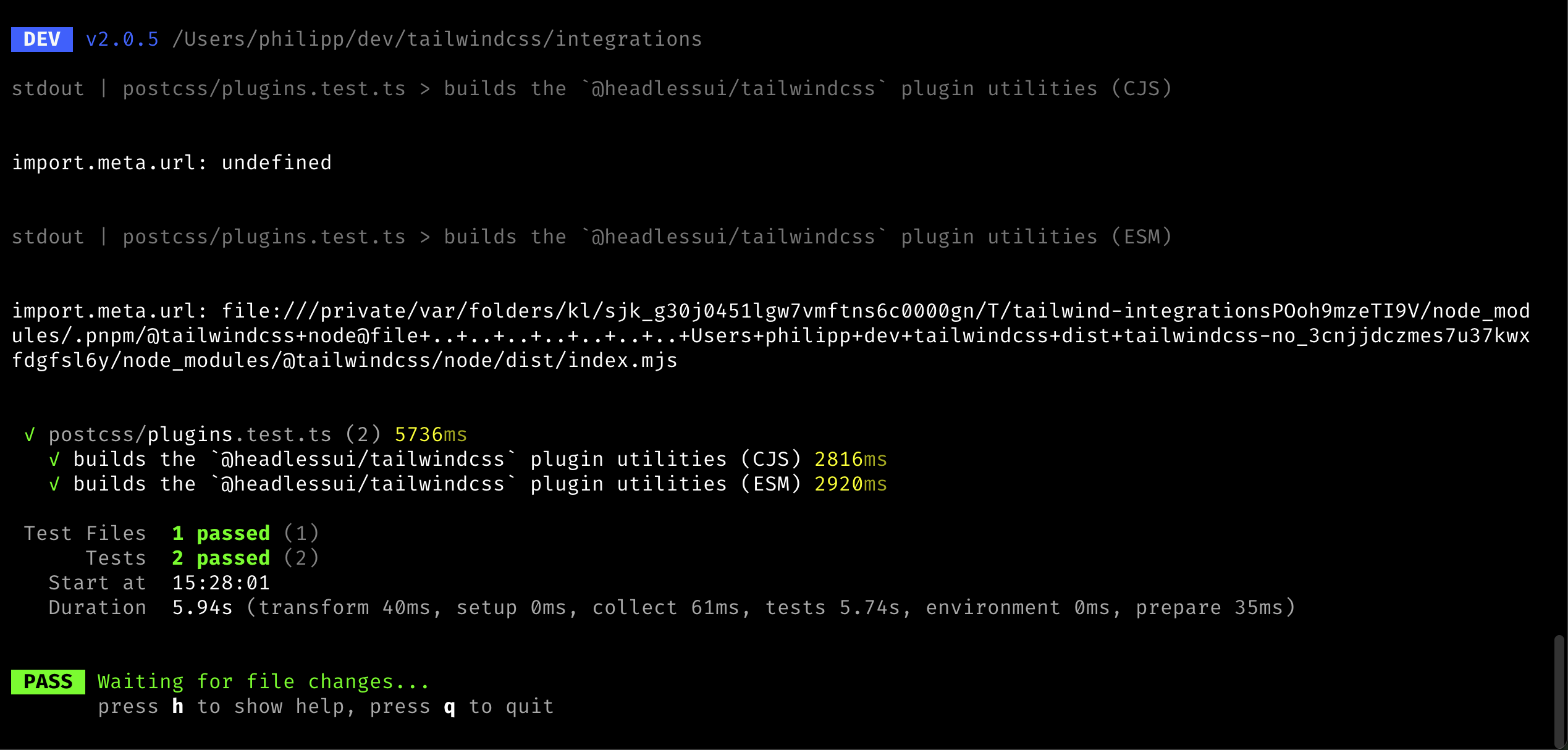
To ensure the tests are resolving to the right environment (CJS vs MJS),
I added logging of the `import.meta.url` value to the resolver code.
When run, this was the output:
Co-authored-by: Adam Wathan <adam.wathan@gmail.com>
This PR improves the heuristics around the important codemod (e.g.
`!border` => `border!`) as we noticed a few more cases where we the
current heuristics was not enough.

Specifically, we made it not migrate the candidate in the following
conditions:

- When there's an immediate property access: `{ "foo": !border.something
+ ""}`
- When it's used as condition in the template language: `<div
v-if="something && !border"></div>` or `<div x-if="!border"></div>`

## Test plan

I added test cases to the unit tests and updated the integration test to
contain a more sophisticated example.

---------

Co-authored-by: Adam Wathan <adam.wathan@gmail.com>
This PR fixes an issue where JS configuration theme properties with dots
or slashes in them would not migrate correctly. E.g.:

```ts
import { type Config } from 'tailwindcss'

module.exports = {
  theme: {
    width: {
      1.5: '0.375rem',
      '1/2': '50%',
    }
  }
}
```

This should convert to:

```css
@theme {
  --width-1_5: 0.375rem;
  --width-1\/2: 50%;
}
```

_Note: We will likely change the `--width-1_5` key to `--width-1\.5` in
a follow-up PR._

---------

Co-authored-by: Robin Malfait <malfait.robin@gmail.com>
Co-authored-by: Adam Wathan <4323180+adamwathan@users.noreply.github.com>
Co-authored-by: Adam Wathan <adam.wathan@gmail.com>
When we implemented the CSS import resolution system, we found out a
detail about CSS imports in that files without a relative path prefix
would still be relative to the source file. E.g.:

```css
@import 'foo.css';
```

Should first look for the file `foo.css` in the same directory. To make
this cost as cheap as possible, we limited this by a heuristics to only
apply the auto-relative imports for files with a file extension.

Naturally, while testing v4 on more templates, we found that it's common
for people to omit the file extension when loading css file. The above
could also be written as such:

```css
@import 'foo';
```

To improve this, we have two options:

- We either remove the heuristics, making every `@import` more expensive
because we have to check for relative files.
- We upgrade our codemods to rewrite `@import` statements to be
explicitly relative.

Because we really care about performance, we opted to go with the latter
option. This PR adds the codemod and removes the heuristics so we
resolve CSS files similar to how you would resolve JS files.

---------

Co-authored-by: Robin Malfait <malfait.robin@gmail.com>
Co-authored-by: Adam Wathan <adam.wathan@gmail.com>
This PR enables JS configuration files with `corePlugins` themes to be
migrated. If such option is found in your config, we will warn the user
and omit the option from the resulting CSS file as there is no v4
alternative.

---------

Co-authored-by: Adam Wathan <adam.wathan@gmail.com>
This PR changes the migration of `content` rules in the JS config to CSS codemods.

When a `content` rule is processed which matches files that are _also matched by the automatic content discovery in v4_, we do not need to emit CSS for that rule.

Take, for example this v3 configuration file:

```ts
import { type Config } from 'tailwindcss'

module.exports = {
  content: [
    './src/**/*.{html,js}',
    './node_modules/my-external-lib/**/*.{html}'
  ],
} satisfies Config
```

Provided the base directories match up, the first rule will also be covered by the automatic content discovery in v4 and thus we only need to convert the second rule to CSS:

```css
@import "tailwindcss";
@source '../node_modules/my-external-lib/**/*.{html}';
```
This PR extends our JS configuration to CSS migration by also allowing `plugins` with options.

An example of such config would be:

```js
import { type Config } from 'tailwindcss'
import myPlugin from "./myPlugin";

export default {
  plugins: [
    myPlugin({
      class: "tw",
    }),
  ],
} satisfies Config;
```

If the option object contains only values allowed in our CSS API, we can convert this to CSS entirely:

```css
@plugin './myPlugin' {
  class: 'tw';
}
```
This PR updates the `extractStaticPlugins` function to also emit options as long as these are objects containing of only `string` and `number` values.

While doing this I also cleaned up the `require('custom-plugin')` detector to use a Tree-Sitter query instead of operating on the AST.

Here are the two cases we considered:

```js
import plugin1 from 'plugin1';

export default {
  plugins: [
    plugin1({
      foo: 'bar',
      num: 19,
    }),
    require('./plugin2')({
      foo: 'bar',
      num: 19,
    }),
  ]
}
```

The test plan also contains a number of scenarios that we do not want to migrate to CSS (because we do not have a CSS API we can use for e.g. nested objects). We do support all types that we also support in the CSS API.
With the changes in #14672, it now becomes trivial to actually resolve
the config (while still retaining the reset behavior). This means that
we can now convert JS configs that use _functions_, e.g.:

```ts
import { type Config } from 'tailwindcss'

export default {
  theme: {
    extend: {
      colors: ({ colors }) => ({
        gray: colors.neutral,
      }),
    },
  },
} satisfies Config
```

This becomes:

```css
@import 'tailwindcss';

@theme {
  --color-gray-50: #fafafa;
  --color-gray-100: #f5f5f5;
  --color-gray-200: #e5e5e5;
  --color-gray-300: #d4d4d4;
  --color-gray-400: #a3a3a3;
  --color-gray-500: #737373;
  --color-gray-600: #525252;
  --color-gray-700: #404040;
  --color-gray-800: #262626;
  --color-gray-900: #171717;
  --color-gray-950: #0a0a0a;
}
```

---------

Co-authored-by: Adam Wathan <adam.wathan@gmail.com>
Co-authored-by: Robin Malfait <malfait.robin@gmail.com>
Imagine the following setup:

```css
/* src/input.css */
@import "tailwindcss";
@config "../tailwind.config.ts";
@theme {
  --color-red-500: #ef4444;
}
```

```ts
/* tailwind.config.ts */
export default {
  theme: {
    colors: {
      red: {
        600: '#dc2626'
      }
    },
    extend: {
      colors: {
        400: '#f87171'
      }
    }
  }
}
```

Since the theme object in the JS config contains `colors` in the
non-`extends` block, you would expect this to _not pull in all the
default colors imported via `@import "tailwindcss";`_. This, however,
wasn't the case right now since all theme options were purely _additive_
to the CSS.

This PR makes it so that non-`extend` theme keys _overwrite default CSS
theme values_. The emphasis is on `default` here since you still want to
be able to overwrite your options via `@theme {}` in user space.

This now generates the same CSS that our upgrade codemods would also
generate as this would apply the new CSS right after the `@import
"tailwindcss";` rule resulting in:

```css
@import "tailwindcss";
@theme {
  --color-*: initial;
  --color-red-400: #f87171;
  --color-red-600: #dc2626;
}
@theme {
  --color-red-500: #ef4444;
}
```

## Keyframes

This PR also adds a new core API to unset keyframes the same way. We
previously had no option of doing that but while working on the above
codemods we noticed that keyframes should behave the same way:

```css
@import "tailwindcss";
@theme {
  --keyframes-*: initial;
  @keyframes spin {
    to {
      transform: rotate(361deg);
    }
  }
}
```

To do this, the keyframes bookeeping was moved from the main Tailwind
CSS v4 file into the `Theme` class.


_I’m not sure super of the API yet but we would need a way for the
codemods to behave the same as out interop layer here. Option B is that
we don't reset keyframes the same way we reset other theme variables_.
I added the `.gitattributes` a while back because I thought it would
help us make it simpler when rebasing changes to the `CHANGELOG.md`
file. However, I don't think this is actually true. Now, instead of a
merge conflict, the rebase just ends up duplicating a lot of lines which
we only see when we review the PR on GitHub later which is really
annoying.

So, for now, let's remove it again. Ideally we can have a better merge
strategy here (or potentially other tools).
This PR builds on top of the new [JS config to CSS
migration](https://github.com/tailwindlabs/tailwindcss/pull/14651) and
extends it to support migrating _static_ plugins.

What are _static_ plugins you might ask? Static plugins are plugins
where we can statically determine that these are coming from a different
file (so there is nothing inside the JS config that creates them). An
example for this is this config file:

```js
import typographyPlugin from '@tailwindcss/typography'
import { type Config } from 'tailwindcss'

export default {
  content: ['./src/**/*.{js,jsx,ts,tsx}'],
  darkMode: 'selector',
  plugins: [typographyPlugin],
} satisfies Config
```

Here, the `plugins` array only has one element and it is a static import
from the `@tailwindcss/typography` module. In this PR we attempt to
parse the config file via Tree-sitter to extract the following
information from this file:

- What are the contents of the `plugins` array
- What are statically imported resources from the file

We then check if _all_ entries in the `plugins` array are either static
resources or _strings_ (something I saw working in some tests but I’m
not sure it still does). We migrate the JS config file to CSS if all
plugins are static and we can migrate them to CSS `@plugin` calls.

## Todo

This will need to be rebased after the updated tests in #14648
Quick follow-up to #14659 base don @thecrypticace's idea:

- This behavior is no longer added to the types of the Plugin API to be
consistent with v3
- When the plugin argument is used as a function, we now warn the first
time
Something we noticed while testing the codemods on one of our codebases
is that the callback passed to the `theme` function properties doesn't
only expose some properties like `colors`, but it's also a function
itself.

```ts
/** @type {import('tailwindcss').Config} */
export default {
  theme: {
    extend: {
      colors: (theme) => {
        // The `theme` is a theme function _and_ the object...
        console.log(theme('spacing.2'), theme.colors.red['500'])
        return {}
      },
    },
  },
  plugins: [],
}
```

E.g.: https://play.tailwindcss.com/eV7Jgv17X1?file=config

---
h/t to @RobinMalfait for the issue description
While working on some fixes for #14639 I noticed that the following v3
configuration file would not load properly in v4:

```ts
import { type Config } from 'tailwindcss'

export default {
  content: ['./src/**/*.{js,jsx,ts,tsx}'],
  theme: {
    extend: {
      colors: ({ colors }) => ({
        gray: colors.neutral,
      }),
  },
} satisfies Config
```

The reason for this is that we did not pass the `colors` property to the
callback function. Since we have colors available now, we can easily add
it.

---------

Co-authored-by: Adam Wathan <adam.wathan@gmail.com>
This PR implements the first version of JS config file migration to CSS.
It is based on the most simple config setups we are using in the
Tailwind UI templates Commit, Primer, Radiant, and Studio.

The example we use in the integration test is a config that looks like
this:

```js
import { type Config } from 'tailwindcss'
import defaultTheme from 'tailwindcss/defaultTheme'

module.exports = {
  darkMode: 'selector',
  content: ['./src/**/*.{html,js}'],
  theme: {
    boxShadow: {
      sm: '0 2px 6px rgb(15 23 42 / 0.08)',
    },
    colors: {
      red: {
        500: '#ef4444',
      },
    },
    fontSize: {
      xs: ['0.75rem', { lineHeight: '1rem' }],
      sm: ['0.875rem', { lineHeight: '1.5rem' }],
      base: ['1rem', { lineHeight: '2rem' }],
    },
    extend: {
      colors: {
        red: {
          600: '#dc2626',
        },
      },
      fontFamily: {
        sans: 'Inter, system-ui, sans-serif',
        display: ['Cabinet Grotesk', ...defaultTheme.fontFamily.sans],
      },
      borderRadius: {
        '4xl': '2rem',
      },
    },
  },
  plugins: [],
} satisfies Config
```

As you can see, this file only has a `darkMode` selector, custom
`content` globs, a `theme` (with some theme keys being overwriting the
default theme and some others extending the defaults). Note that it does
not support `plugins` and/or `presets` yet.

In the case above, we will find the CSS file containing the existing
`@tailwind` directives and are migrating it to the following:

```css
@import 'tailwindcss';

@source './**/*.{html,js}';

@variant dark (&:where(.dark, .dark *));

@theme {
  --box-shadow-*: initial;
  --box-shadow-sm: 0 2px 6px rgb(15 23 42 / 0.08);

  --color-*: initial;
  --color-red-500: #ef4444;

  --font-size-*: initial;
  --font-size-xs: 0.75rem;
  --font-size-xs--line-height: 1rem;
  --font-size-sm: 0.875rem;
  --font-size-sm--line-height: 1.5rem;
  --font-size-base: 1rem;
  --font-size-base--line-height: 2rem;

  --color-red-600: #dc2626;

  --font-family-sans: Inter, system-ui, sans-serif;
  --font-family-display: Cabinet Grotesk, ui-sans-serif, system-ui, sans-serif, "Apple Color Emoji", "Segoe UI Emoji", "Segoe UI Symbol", "Noto Color Emoji";

  --border-radius-4xl: 2rem;
}
```

This replicates all features of the JS config so we can even delete the
existing JS config in this case.

---------

Co-authored-by: Robin Malfait <malfait.robin@gmail.com>
This PR attempts to detect simple postcss setups: These are setups that
do not load dynamic modules and are based off the examples we are
[recommending in our
docs](https://tailwindcss.com/docs/installation/using-postcss). We
detect wether a config is appropriate by having it use the object plugin
config and by not requiring any other modules:

```js
module.exports = {
  plugins: {
    tailwindcss: {},
    autoprefixer: {},
  },
}
```

When we find such a config file, we will go over it line-by-line and
attempt to:

- Upgrade `tailwindcss:` to `'@tailwindcss/postcss':`
- Remove `autoprefixer` if used

We then attempt to install and remove the respective npm packages based
on the package manger we detect.

And since we now have logic to upgrade packages, this also makes sure to
install `tailwindcss@next` at the end of a sucessful migration.

---------

Co-authored-by: Robin Malfait <malfait.robin@gmail.com>
We currently have three different implementations of the
`resolveThemeValue()` Theme method:

1. The _core_ version which only resolves based on the exact CSS
variable name. This is the v4-only version.
2. A _compat light_ version which attempts to translate a dot-notation
keypath to a CSS variable name.
3. A _full compat_ version which resolves the legacy theme object which
is used whenever a `@plugin` or `@config` is added.

Unfortunately, there are some issues with this approach that we've
encountered when testing the CSS `theme()` function while upgrading
Tailwind Templates to v4 using our upgrading toolkit.

1. The _compat light_ resolver was trying to convert `theme(spacing.1)`
to tuple syntax. Tuples require a nested property access, though, and
instead this should be convert to `theme(--spacing-1)`.
2. We currently only load _full compat_ version if `@plugin` or
`@config` directives are used. It is possible, though, that we need the
full compat mapping in other cases as well. One example we encountered
is `theme(fontWeight.semibold)` which maps to a dictionary in the
default theme that that we do not have an equivalent for in v4
variables.

To fix both issues, we decided to remove the _compat light_ version of
the `theme()` function in favor of adding this behavior to an upgrade
codemod. Instead, the second layer now only decides wether it can use
the _core_ version or wether it needs to upgrade to the _full compat_
version. Since typos would trigger a _hard error_, we do not think this
has unintended performance consequences if someone wants to use the
_core_ version only (they would get an error regardless which they need
to fix in order to continue).
Fixes#14613
Don't crash when trying to read the modification time of a file that
might already be deleted.
Note: This fix is purely theoretical right now as I wasn't able to
reproduce the issue yet.
---------
Co-authored-by: Jordan Pittman <jordan@cryptica.me>
This PR fixes two issues we found when testing the candidate codemodes:

1. Sometimes, core would emit the same candidate twice. This would
result into rewriting a range multiple times, without realizing that
this change might already be applied, causing it to swallow or duplicate
some bytes.
2. The codemods were mutating the `Candidate` object, however since the
`Candidate` parsing is _cached_ in core, it would sometimes return the
same instance. This is an issue especially since we monkey patch the
prefix to `null` when migrating prefixed candidates. This means that a
candidate would be cached that would be _invalid relative to the real
design system_. We fixed this by making sure the mutations would only be
applied to clones of the `Candidate` and I changed the `DesignSystem`
API to return `ReadOnly<T>` versions of these candidates. A better
solution would maybe be to disable the cache at all but this requires
broader changes in Core.
We're trialing [namespace.so](https://namespace.so/) for their custom
GitHub Action workers. So far we're seeing an improvement of 3 minutes
in our pipeline (used to take 6min 30sec and now it's 3min 30sec, an
almost 50% improvement!).

We can always revert this PR, but I recommend we try it out by enabling
it for our CI for the next few days.
In order to properly migrate your Tailwind CSS v3 project to v4, we need
access to the JavaScript configuration object. This was previously only
required for template migrations, but in this PR we're making it so that
this is also a prerequisite of the CSS migrations. This is because some
migrations, like `@apply`, also need to convert candidates that to the
v4 syntax and we need the full config in order to properly validate
them.

In addition to requiring a JS config, we also now attempt to
automatically find the right configuration file inside the current
working directory. This is now matching the behavior of the Tailwind CSS
v3 CLI where it will find the config automatically if it's in the
current directory and called `tailwind.conf.js`.

---------

Co-authored-by: Robin Malfait <malfait.robin@gmail.com>
In v3 it was possible to import `*.js` variants of compat files, e.g.
`tailwindcss/plugin.js` in addition to `tailwindcss/plugin`. We need to
properly map the exports to support this.
This PR extracts all _candidate migrations_ from the existing _template
migrations_ and reuses these in the `@apply` CSS migration. Seems like
this _JustWorks✨_.

---------

Co-authored-by: Adam Wathan <adam.wathan@gmail.com>
Part-of #14558

After handling `@import` of stylesheets in core, we can no longer gate
out features based on finding a specific sequence in the input CSS, as
this string will not contain contents from other stylesheets.

So, consider the following input CSS:

```css
@import "tailwindcsss";
@import "./styles.css";
```

We can't opt-out of the traversal to search for `@apply` based on it
because it, of course, does not contain the contents of `./styles.css`
yet.

---------

Co-authored-by: Adam Wathan <adam.wathan@gmail.com>
One of the breaking changes of v4 is the [inversion of variant order
application](https://github.com/tailwindlabs/tailwindcss/pull/13478). In
v3, variants are applied "inside-out".


For example a candidate like `*:first:underline` would produce the
following CSS in v3:

```css
.\*\:first\:underline:first-child > * {
  text-decoration-line: underline;
}
```

To get the same behavior in v4, you would need to invert the candidate
order to `first:*:underline`. This would generate the following CSS in
v4:

```css
:where(.first\:\*\:underline:first-child > *) {
  text-decoration-line: underline;
}
```

## The Migration

The most naive approach would be to invert the variants for every
candidate with at least two variants. This, however, runs into one issue
and some unexpected inconsistencies. I have identified the following
areas:

1. Some pseudo class variants _must appear at the end of the selector_.
v3 was patching over this by doing some manual reordering in for these
variants. For example, in v3, both of these variants create the same
output CSS: `hover:before:underline` and `before:hover:underline`. In v4
we simplified this system though and no longer generate the same output
in both cases. Instead, you'd always want to write
`hover:before:underline`, ensuring that these variants will appear at
the end.

For an exact list of which variants these affect, take a look [at this
diff](https://github.com/tailwindlabs/tailwindcss/pull/13478/files#diff-7779a0eebf6b980dd3abd63b39729b3023cf9a31c91594f5a25ea020b066e1c0L228-L246).

2. The `dark` variant and other at-rule variants are usually written
before other variants. This is more of a recommendation to make it
easier to read candidates rather than a difference in behavior as
`@media` queries are hoisted by the engine. For this reason, both of
these variants are _correct_ yet in real applications we prefer the
first one: `lg:hover:underline`, `hover:lg:underline`.

To avoid shuffling these rules across all candidates during the
migration, we bucket `dark` and other at-rule variants into a special
bucket that will not have their order changed (since people wrote stacks
like `sm:max-lg:` before and we want to keep them as-is) and appear
before all other variants.

3. For some variant stacks, the order does not matter. E.g.:
`focus:hover:underline` and `hover:focus:underline` will be the same. We
don't want to needlessly shuffle their order if we have to.

With these considerations, the migration now works as follows:

- If there is less then two variants, we do not need to migrate the
candidate
- If _every_ variant in the stack is an order-independent variant, we do
not need to migrate the candidate
- _Note that this is currently hardcoded to only support `&:hover` and
`&:focus`._
- Otherwise, we loop over the candidates and put them into three
buckets:
- `mediaVariants` hold variants that only contribute `@media` rules
_and_ the `dark` variant.
- `pseudoElementVariants` hold variants that _must appear at the end of
the selector_. This is based on the allow list from v3/early v4.
  - `regularVariants` contains the rest.
- We now compute if any of the variants inside `regularVariants` is
order dependent.
- With this list of variants, we now construct the new order of variants
as:

   ```ts
   [
     ...atRuleVariants,
...(anyRegularVariantOrderDependent ? regularVariants.reverse() :
regularVariants),
     ...pseudoElementVariants,
   ]
   ```

---------

Co-authored-by: Adam Wathan <adam.wathan@gmail.com>
This PR adds a new migration that can migrate Tailwind CSS v3 style
prefixes into Tailwind CSS v4.

The migration is split into three separate pieces of work:

1. Firstly, we need to read the full JavaScript config to get the _old_
prefix option. This is necessary because in v4, we will not allow things
like custom-separators for the prefix. From this option we will then try
and compute a new prefix (in 90% of the cases this is going to just
remove the trailing `-` but it can also work in more complex cases).
2. Then we migrate all Candidates. The important thing here is that we
need to operate on the raw candidate string because by relying on
`parseCandidate` (which we do for all other migrations) would not work,
as the candidates are not valid in v4 syntax. More on that in a bit.
3. Lastly we also make sure to update the CSS config to include the new
prefix. This is done by prepending the prefix option like so:

    ```css
    @import "tailwindcss" prefix(tw);
    ```

### Migrating candidates

The main difference between v3 prefixes and v4 prefixes is that in v3,
the prefix was _part of the utility_ where as in v4 it is _always in
front of the CSS class.

So, for example, this candidate in v3:

```
hover:-tw-mr-4
```

Would be converted to the following in v4:

```
tw:hover:-mr-4
```

Since the first example _won't parse as a valid Candidate in v4, as the
`tw-mr` utility does not exist, we have to operate on the raw candidate
string first. To do this I created a fork of the `parseCandidate`
function _without any validation of utilities or variants_. This is used
to identify part of the candidate that is the `base` and then ensuring
the `base` starts with the old prefix. We then remove this to create an
"unprefixed" candidate that we validate against a version of the
DesignSystem _with no prefixes configured_. If the variant is valid this
way, we can then print it again with the `DesignSystem` that has the new
prefix to get the migrated version.

Since we set up the `DesignSystem` to include the new prefix, we can
also be certain that migrations that happen afterwards would still
disqualify candidates that aren't valid according to the new prefix
policy. This does mean we need to have the prefix fixup be the first
step in our pipeline.

One interesting bit is that in v3, arbitrary properties did not require
prefixes where as in v4 they do. So the following candidate:

```
[color:red]
```

Will be converted to:

```
tw:[color:red]
```
When your Vite or postcss project has multiple Tailwind CSS roots with
different configs, they should not influence each other (with the
exception of the same candidates being used).
I noticed some more unexpected values being passed through as _bare
values_: Decimal places with zero.

These should not generate CSS but currently does:

- `from-25.%`
- `from-25.0%`
- `from-25.00%`
- etc.
 Philipp Spiess